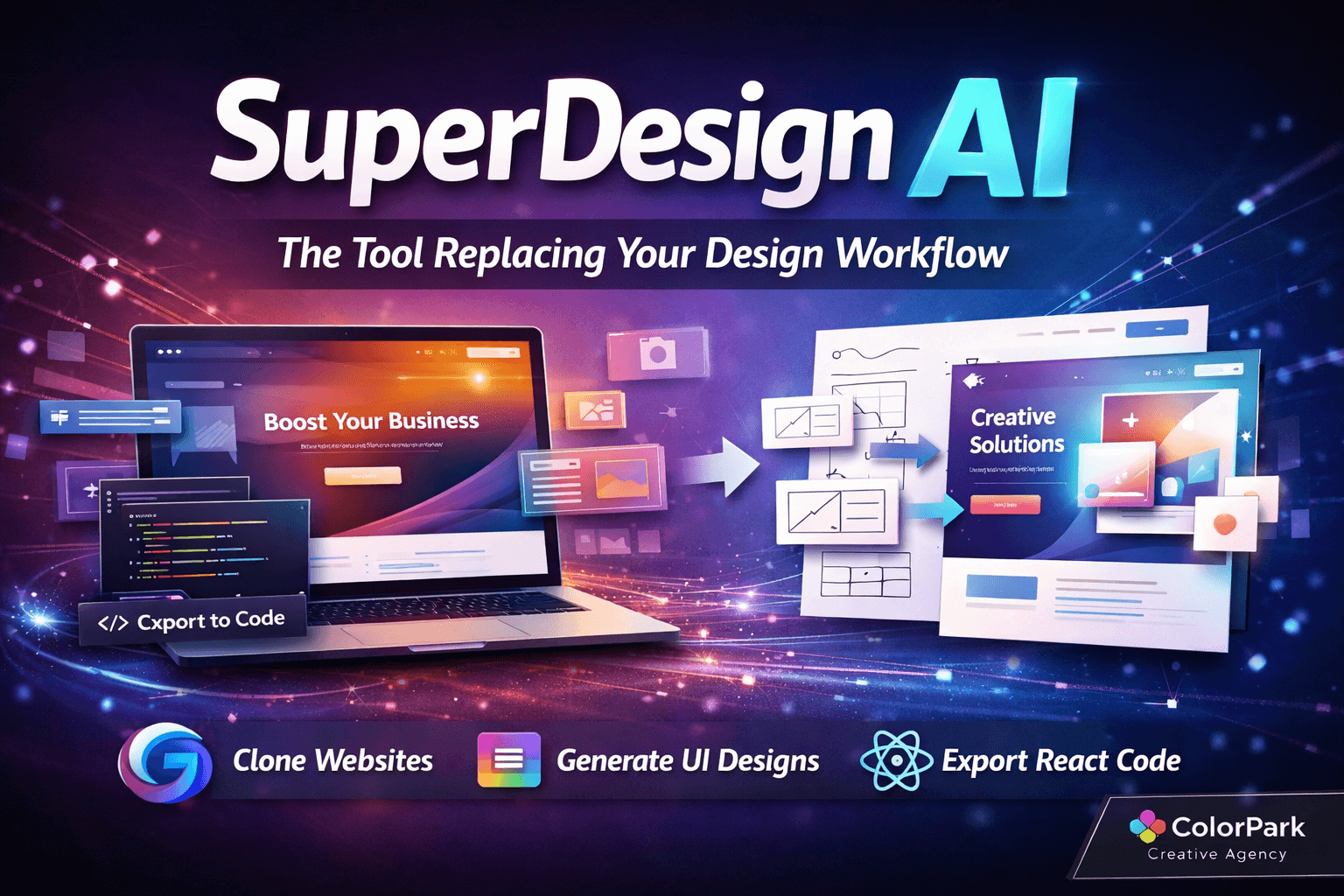
SuperDesign AI: The Tool Replacing Your Design Workflow
The design world just shifted. Not a subtle tremor—a full seismic event. SuperDesign dropped at superdesign.dev, and within hours of testing it, the realization hit hard: this changes everything about how creative teams build digital products.
Picture this scenario. A client needs three landing page variations by tomorrow. Traditional workflow: open Figma, sketch wireframes, polish components, create design system tokens, hand off to developers, pray the implementation matches. That process takes days. SuperDesign compresses it into hours. Sometimes minutes.
This AI-powered UI design tool runs on Gemini 3, currently the most sophisticated model for generating visually coherent, brand-consistent interfaces. But raw AI power means nothing without smart workflow integration. SuperDesign nails both. It combines intelligent design generation with what practitioners call vibe coding—a fluid movement between visual creation and production-ready code that feels less like switching tools and more like thinking out loud.
For brands hungry for rapid iteration, startups racing to validate concepts, and agencies juggling multiple client aesthetics, this tool represents a fundamental shift in creative possibility. Let's break down exactly what makes SuperDesign worth your attention.
Why Traditional Design Workflows Hit a Wall
Creative teams face an uncomfortable truth. The gap between envisioning an interface and actually building it remains frustratingly wide. Designers spend hours perfecting Figma files that developers then reconstruct from scratch. Context gets lost. Brand nuances disappear. Deadlines slip.
The friction points stack up quickly:
Translation Loss — A designer creates a pixel-perfect mockup. The developer interprets it. The result rarely matches the original vision. Colors shift subtly. Spacing feels off. Typography loses its rhythm. Each handoff introduces entropy.
Iteration Bottlenecks — Client wants to see that hero section with a different layout? Back to the design tool. Rebuild. Export. Share. Wait for feedback. Repeat. Every revision cycle consumes hours that could fuel creative exploration.
Consistency Challenges — Maintaining brand coherence across dozens of screens requires constant vigilance. Style guides help, but implementation drift happens. Components evolve differently across team members. The design system slowly fragments.
Prototyping Limitations — Static mockups can't demonstrate interaction patterns. Teams build throwaway prototypes to communicate animation intent. More time lost to tools that don't connect.
SuperDesign attacks each of these pain points directly. Not by adding more steps to existing workflows, but by collapsing the entire design-to-code pipeline into a single, AI-augmented environment.
The Gemini 3 Difference in Visual Intelligence
AI design tools have existed for years. Most produce generic, template-driven outputs that scream "generated by algorithm." Gemini 3 changes the equation fundamentally.
This model understands visual hierarchy in ways previous AI couldn't grasp. It recognizes that a premium fintech app needs different spacing rhythms than a playful consumer brand. It distinguishes between minimalist elegance and cold emptiness. It knows when typography should command attention and when it should recede.
Testing SuperDesign against complex reference designs revealed surprising sophistication. Cloning a site from curated.design—a platform showcasing exceptional web design—produced results that captured not just layout but feeling. The AI preserved the personality of bold typography choices, understood the intentional tension in asymmetric compositions, and maintained the breathing room that transforms competent design into memorable experience.
This visual intelligence stems from Gemini 3's training on design-specific data at scale. The model has absorbed thousands of award-winning interfaces, learned the patterns that distinguish mediocre from exceptional, and developed an intuition for brand-appropriate aesthetics.
More practically, it means prompting SuperDesign with "add a promotional banner in the brand style" produces something that actually belongs. Not a generic floating box, but a component that inherits typography, color relationships, and spatial logic from the existing design.
Two Modes, Infinite Possibilities
SuperDesign organizes creative work around two complementary modes: Design and Wireframe. Understanding when to use each unlocks the tool's full potential.
Design Mode: Polished and Production-Ready
Design mode generates finished UI components. High-fidelity screens that could ship tomorrow. This mode shines when:
- Building from existing brand foundations
- Creating variations of established patterns
- Rapidly prototyping client-ready concepts
- Generating assets for stakeholder presentations
The AI produces fully styled components with realistic content, appropriate imagery, and coherent visual treatment. Outputs look like the work of an experienced designer, not placeholder boxes waiting for "real" design.
Wireframe Mode: Sketch to Screen
Wireframe mode inverts the traditional process. Rough sketches become polished interfaces. Draw boxes, indicate hierarchy, scribble basic labels—SuperDesign interprets the intent and generates proper UI.
This capability transforms ideation sessions. Product managers can sketch concepts during meetings. Developers can communicate layout ideas without design tool proficiency. The AI translates rough thinking into refined visual language.
Watching the transformation feels almost magical. A hand-drawn rectangle becomes a properly styled card component. A wavy line indicating an image becomes a contextually appropriate photograph. Labels become typography that fits the established design system.
The friction between thinking and making nearly disappears.
Chrome Extension: Clone Anything, Improve Everything
SuperDesign's Chrome extension deserves special attention. It enables something previously impossible: capturing any live website and importing it as an editable project.
The implications are profound. Competitive analysis becomes hands-on. Instead of passively studying competitor interfaces, teams can clone them and experiment. What happens if we restructure their navigation? How would their aesthetic work with our product hierarchy? Questions that once required speculation now have tangible answers.
The extension captures not just visual structure but the underlying DNA—colors, fonts, spacing relationships. SuperDesign reconstructs the design system implicitly, allowing modifications that maintain coherence rather than introducing jarring inconsistencies.
Real-world testing revealed impressive fidelity. Complex layouts with overlapping elements, custom typography, and sophisticated animation hints all transferred successfully. The reconstruction isn't pixel-perfect—that would require fundamentally different technology—but it's close enough for meaningful iteration.
Practical Applications
Redesign Pitches — Agency wants to win a prospect? Clone their current site, demonstrate improvements within hours. The before/after comparison sells the vision more effectively than any slide deck.
Internal Updates — Product team needs to refresh an aging interface? Clone the current state, experiment with modernization approaches, present options to stakeholders without committing development resources.
Learning Exercises — Junior designers can clone exceptional interfaces, deconstruct what makes them work, and practice modifications that deepen understanding.
AI-Powered Editing: Prompt Your Way to Polish
Once a design exists in SuperDesign—whether generated fresh or cloned from the web—AI editing unlocks rapid iteration. Natural language prompts trigger intelligent modifications.
The prompt interface feels remarkably intuitive. Describing the desired change produces coherent results:
"Add a 20% off promotional banner that matches the site's visual style" — The AI generates a banner using existing brand colors, typography, and spacing conventions. Not a generic alert box, but a design-appropriate component.
"Fix the overlapping navigation issue on mobile" — SuperDesign analyzes the layout, identifies the conflict, and restructures elements to work at smaller breakpoints.
"Create a footer section with social links and newsletter signup" — The AI generates a complete footer that feels native to the existing design, including appropriate iconography and form styling.
The capability extends beyond simple additions. Prompts can request tonal shifts ("make this feel more premium"), structural changes ("reorganize the feature grid into a comparison table"), or accessibility improvements ("increase text contrast to meet WCAG standards").
Each modification maintains brand coherence. The AI has internalized the design's visual language and applies that understanding to every change. This consistency—often the hardest thing to maintain during rapid iteration—comes essentially for free.
Export Options That Close the Loop
Beautiful designs mean nothing if developers can't implement them. SuperDesign's export capabilities bridge the final gap.
Code Export
Projects export as production-grade React code. Not simplified demos or partial implementations—actual component structures ready for integration. The exported code includes:
- Proper component architecture
- Styled components or CSS modules (configurable)
- Responsive breakpoint handling
- Semantic HTML structure
- Accessibility attributes
Developers receive a starting point that requires enhancement, not reconstruction. They can focus on business logic, data integration, and interaction refinement rather than translating visual design into markup.
The code integrates directly with popular development environments. Cursor, Claude Code, and VS Code all accept SuperDesign exports cleanly. Teams already invested in these tools add SuperDesign to their workflow without disruption.
Style Definitions
Perhaps more valuable than code export: style.md generation. SuperDesign analyzes a design and produces a comprehensive markdown file documenting every style decision.
This file becomes the source of truth for design implementation. Colors with exact hex values. Typography scales with precise sizing. Spacing tokens with consistent naming. The implicit design system becomes explicit, portable, and version-controllable.
Development teams paste style.md into their projects as a reference. AI coding assistants like Claude Code read the file and apply styles automatically during implementation. The translation loss between design and development shrinks to nearly zero.
Practical Export Workflow
A realistic workflow emerges:
- Generate or clone design in SuperDesign
- Iterate with AI prompts until stakeholder approval
- Export style.md to establish design tokens
- Export React code as implementation starting point
- Develop features using style.md as automated style reference
- Deploy production code that matches approved design
This pipeline collapses days of traditional handoff into hours. More importantly, it maintains fidelity that manual translation struggles to achieve.
Canvas Features for Creative Control
While AI drives much of SuperDesign's power, manual control remains essential for craft. The canvas interface provides tools that experienced designers expect.
Direct Manipulation — Drag elements, resize containers, adjust spacing manually. AI suggestions complement rather than replace human judgment.
Component Library — Add pre-built elements—buttons, cards, forms, navigation—and customize to fit the project aesthetic.
Image Integration — Insert images directly, and the AI suggests appropriate cropping, filtering, and placement.
Wireframe Drawing — Sketch rough shapes directly on canvas, then convert to polished components with a single command.
Multi-Artboard Support — Work across multiple screens simultaneously, maintaining consistency across flows.
The canvas feels responsive and familiar to anyone with design tool experience. SuperDesign didn't reinvent interface paradigms—it enhanced them with intelligent assistance.
Version Control for Iterative Work
Creative projects evolve through iterations. Ideas that seemed perfect yesterday need adjustment today. SuperDesign builds version management directly into the workflow.
Screenshot Capture — Freeze the current state at any point. Build a visual timeline of how the design evolved.
Annotation — Mark up captured states with notes, questions, and feedback. Create a decision record that survives project handoffs.
Version Comparison — View different iterations side-by-side. Understand exactly what changed and why.
Restore Points — Return to any previous state without losing subsequent work. Experiment freely knowing rollback remains possible.
For agencies managing multiple client revisions, this capability alone justifies adoption. No more lost feedback, no more confusion about which version received approval, no more accidental overwriting of client-preferred elements.
Device Preview for Responsive Confidence
Responsive design remains one of the industry's persistent challenges. Layouts that work beautifully at desktop resolutions collapse at mobile breakpoints. SuperDesign's preview system addresses this directly.
Toggle between device sizes to see how designs render across the breakpoint spectrum. The preview isn't a simple resize—it shows actual responsive behavior, including how elements reflow, stack, and adapt.
More critically, the AI understands responsive patterns. When generating new components or modifying existing ones, SuperDesign considers all breakpoints simultaneously. A prompt like "add a feature comparison section" produces a component that works on desktop and mobile, not just the currently visible size.
This built-in responsiveness dramatically reduces the iteration cycles typically required for mobile optimization. Designs ship responsive by default rather than requiring separate mobile refinement passes.
Light and Dark Mode: Work Your Way
A small feature with outsized impact: SuperDesign supports both light and dark interface modes. Extended creative sessions become more comfortable when the tool respects your visual preference.
Beyond personal comfort, this matters for design accuracy. Working in dark mode on a bright interface creates eye strain that subtly distorts color perception. Matching your work environment to your natural preference produces better color decisions.
The toggle sits accessible in the interface, allowing quick switching when reviewing designs destined for different contexts. Preview the dark-mode version of a landing page while working in the dark-mode interface—the alignment creates perceptual consistency.
Who Should Use SuperDesign?
SuperDesign serves multiple roles within creative and product teams:
Designers
For professional designers, SuperDesign amplifies output without diminishing craft. Use AI to handle repetitive component generation while focusing human creativity on conceptual direction and fine-tuning. The tool becomes a multiplier, not a replacement.
Developers
Developers gain design vocabulary and visual output capability. Instead of depending entirely on design handoffs, developers can generate reasonable starting points, communicate layout ideas visually, and iterate on interface details independently.
Product Managers
Product managers often have interface ideas that get lost in translation to design briefs. SuperDesign allows direct expression—sketch a wireframe, describe desired components, generate something that communicates intent far more effectively than written descriptions.
Marketing Teams
Marketing needs landing pages and campaign assets at speeds traditional design can't match. SuperDesign produces on-brand variations rapidly, enabling A/B testing at scale and campaign iteration without bottlenecking on design resources.
Startup Founders
Solo founders and tiny teams wear every hat. SuperDesign compresses the design function into manageable scope. Generate professional-quality interfaces without design expertise, iterate based on user feedback, and ship polished products despite resource constraints.
What SuperDesign Changes About 2026
Industry observers have predicted AI's transformation of creative work for years. The predictions always felt premature—AI tools produced outputs that needed so much refinement they barely saved time.
2026 marks the inflection point. Gemini 3's visual intelligence combined with SuperDesign's workflow integration crosses the quality threshold. AI-generated designs now require enhancement rather than reconstruction. The economics of creative production shift fundamentally.
Consider the implications:
Faster Iteration — Ideas that once required days to visualize now materialize in minutes. Teams can explore more concepts, test more variations, and converge on better solutions.
Democratized Design — Non-designers contribute meaningfully to visual output. Product decisions involve actual prototypes rather than abstract discussions.
Maintained Consistency — AI that understands design systems maintains coherence across sprawling projects. Brand drift becomes harder to achieve accidentally.
Reduced Handoff Friction — Design-to-code pipelines compress. Developer interpretation gets replaced by direct export. What designers envision matches what users experience.
These shifts won't eliminate design roles—they'll redefine them. Designers become curators and directors, guiding AI toward appropriate expressions of brand intent, refining outputs with human judgment, and solving problems that require genuine creativity rather than production skill.
The winners in this new landscape will be those who embrace the tools earliest, learn their capabilities deepest, and integrate them most fluidly into existing workflows. SuperDesign provides an excellent starting point for that journey.
Getting Started with SuperDesign
Ready to experiment? The path begins simply:
- Visit superdesign.dev and create an account
- Install the Chrome extension for website cloning
- Clone a site you admire to explore the interface
- Try AI editing prompts to modify the clone
- Generate fresh designs from wireframe sketches
- Export code and style.md to see production output
The learning curve feels gentle. Anyone familiar with design tools will recognize the canvas paradigms. The AI assistance surfaces naturally—always available, never intrusive.
Currently in beta, SuperDesign continues rapid development. Features announced weekly. Community feedback shapes the roadmap. Early adopters gain influence over the tool's evolution.
🎨 Let's Create Something Bold
Ready to transform your brand's visual identity? ColorPark crafts designs that convert.
- 🚀 Start Your Project: colorpark.io/contact
- 📧 Email: hello@colorpark.io
- 📞 Phone: +880 1723-741224
- 🌐 View Portfolio: colorpark.io/projects
Part of the Mejba Ahmed brand family: mejba.me • ramlit.com • xcybersecurity.io
Share Your Thoughts
Your email won't be published. We welcome your feedback, questions, or suggestions.